
Dunning Management: How AI Goes Beyond Traditional Dunning Cadences to Personalize Payment Reminders
July 27, 2026Summary
SAP Business One reconciliation automation enables mid-market finance teams to eliminate manual reconciliation bottlenecks by combining AI-powered Cash Application and Reconciliation AI Agents with real-time ERP synchronization. While internal reconciliation in SAP Business One ensures accounting accuracy, modern finance operations require reconciling customer remittances, bank statements, supplier documents, and external data that originate outside the ERP. This blog explores the reconciliation gap, explains how AI bridges it, and demonstrates how Kapittx helps finance teams accelerate cash application, improve financial accuracy, and shorten month-end close.
Introduction
SAP Business One has earned its reputation as one of the leading ERP solutions for small and mid-market businesses. It offers robust accounting, inventory management, purchasing, sales, banking, and financial reporting capabilities that help organizations manage day-to-day financial operations efficiently. However, as businesses scale, finance teams encounter a growing challenge reconciliation.
While SAP Business One is excellent at recording financial transactions and generating reports, many reconciliation activities begin outside the ERP. Customer payments arrive with remittance advice, banks send statements in proprietary formats, vendors submit invoices in different layouts, and logistics teams generate Goods Received Notes (GRNs). Before these transactions can be reconciled inside SAP Business One, finance teams must first interpret, validate, and match information from multiple sources. This creates what many organizations experience as the SAP Business One reconciliation gap the manual effort required to bridge data between external documents and ERP records.
The result is slower cash application, delayed month-end close, increased reconciliation errors, and reduced visibility into working capital.
Fortunately, advances in Artificial Intelligence (AI) are transforming reconciliation. AI-powered Cash Application AI Agents and Reconciliation AI Agents now automate much of the work that previously consumed finance teams for hours every day.
Understanding Internal Reconciliation in SAP Business One
Internal reconciliation in SAP Business One is the process of matching accounting transactions to ensure customer, vendor, and General Ledger balances accurately reflect outstanding financial positions.
Common reconciliation processes include:
- Customer invoice vs. payment
- Vendor invoice vs. payment
- Credit memo reconciliation
- Debit memo adjustments
- Journal entry reconciliation
- Bank reconciliation
- General Ledger (GL) reconciliation
- Inter-company reconciliation
- Advance payment adjustments
These capabilities are essential for maintaining accounting integrity and producing accurate financial statements. However, today's finance teams perform reconciliation far beyond these ERP transactions. They must reconcile information arriving from banks, customers, suppliers, logistics providers, and other enterprise systems, many of which were never designed to integrate seamlessly with SAP Business One.
The Modern Reconciliation Challenge
Finance departments no longer receive information from a single system. A single customer payment may involve:
- A bank statement
- A remittance advice
- Multiple invoices
- Debit notes
- Credit notes
- Promotional deductions
- Tax adjustments
Likewise, supplier reconciliation may involve:
- Purchase Orders
- Goods Received Notes (GRNs)
- Supplier invoices
- Freight invoices
- Warehouse confirmations
Each document contains valuable information, but interpreting and matching it manually is both time-consuming and error-prone.
Documents Arrive in Many Different Formats
One of the biggest challenges is that supporting documents rarely follow a standard format.
Finance teams regularly receive information through:
- PDF files
- Excel spreadsheets
- CSV files
- Word documents
- XML files
- EDI transactions
- Bank portal downloads
- Customer portals
- Shared folders
- Mobile photographs
- Scanned images
- APIs
- ZIP attachments
Every customer may use a different remittance template. Every bank may produce statements in a unique format. Vendors may send invoices as PDFs, Excel files, or even scanned images.
Reading, interpreting, validating, and matching these documents is not a native capability of SAP Business One.
Consequently, finance teams rely on spreadsheets, manual reviews, and repetitive data entry to reconcile transactions before updating the ERP.
Why Traditional Automation Is No Longer Enough
Many organizations have implemented OCR tools or simple workflow automation.
These technologies help digitize documents but still depend heavily on predefined templates and static business rules.
Modern finance operations require systems that can understand business context rather than simply extract text.
This is where AI Agents are transforming finance.
Cash Application AI Agent
A Cash Application AI Agent understands customer remittances regardless of format. It extracts invoice references, payment amounts, deductions, discounts, taxes, and payment instructions before intelligently recommending or automatically applying payments against outstanding invoices.
Reconciliation AI Agent
A Reconciliation AI Agent continuously compares financial transactions across SAP Business One, bank statements, supplier documents, customer communications, and supporting records. Rather than relying only on fixed rules, it understands historical payment behavior, learns reconciliation patterns, and presents only genuine exceptions requiring human review.
Instead of asking finance professionals to review every transaction, AI Agents automate routine reconciliation while allowing finance teams to focus on exceptions and decision-making.
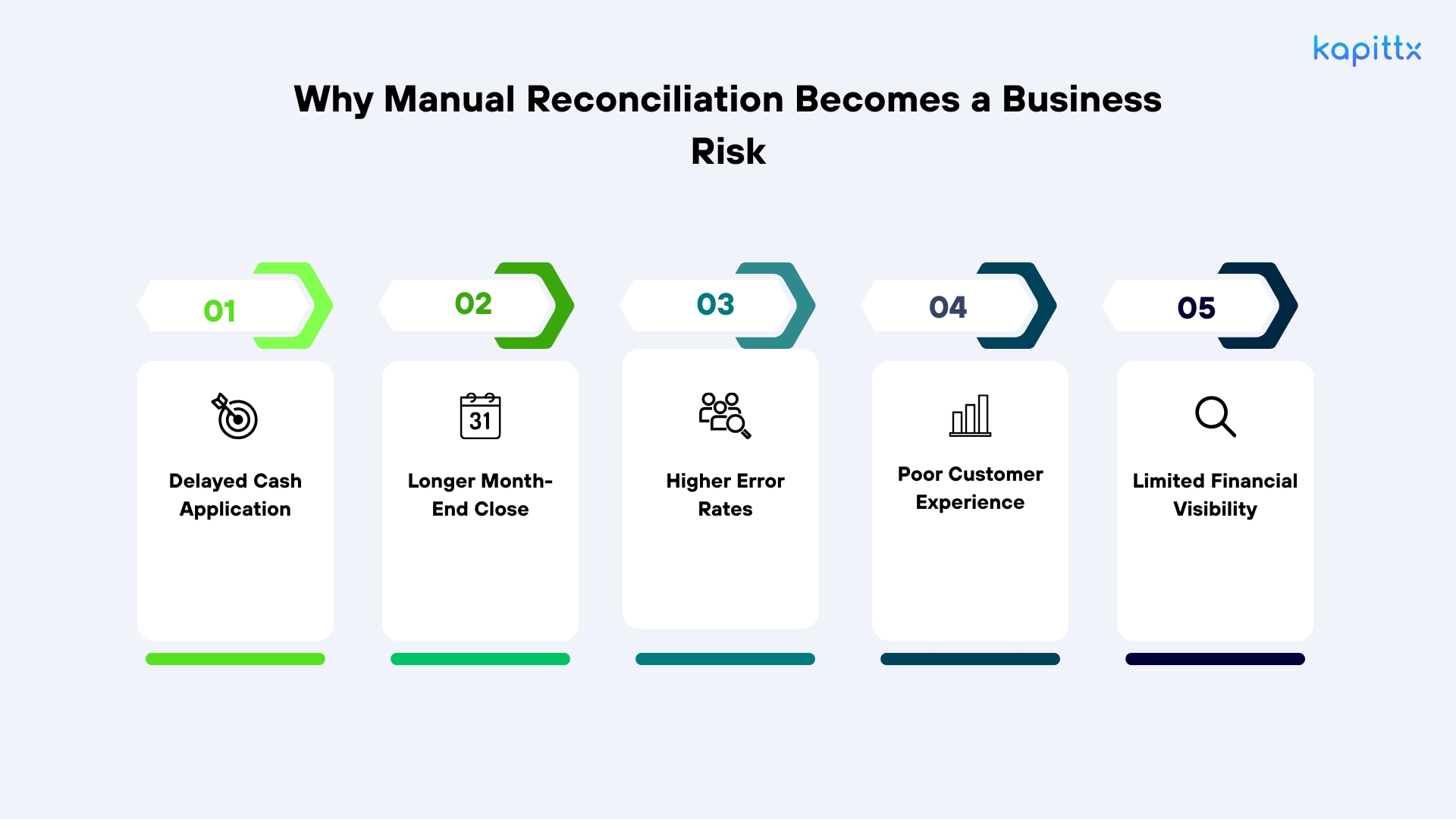
Why Manual Reconciliation Becomes a Business Risk
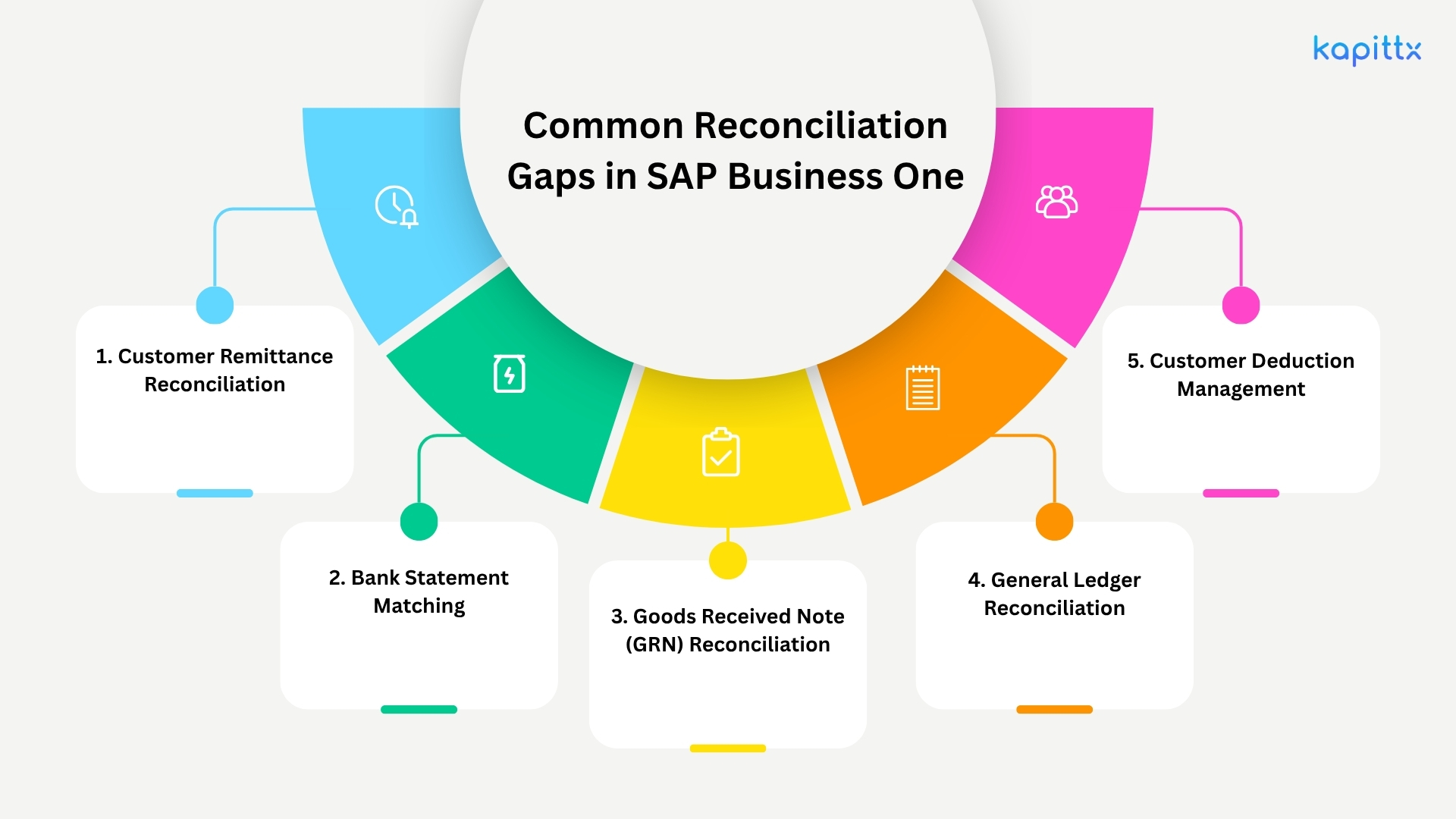
1. Customer Remittance Reconciliation
Customer remittance advice often references dozens of invoices, deductions, taxes, and discounts.
Kapittx's Cash Application AI Agent automatically reads remittance advice received through email, PDF, Excel, XML, customer portals, or scanned documents. It extracts payment information, identifies invoice references, understands deduction reasons, and recommends accurate cash application inside SAP Business One.
2. Bank Statement Matching
Bank deposits frequently consolidate multiple customer payments.
Instead of manually reviewing bank narration, the Cash Application AI Agent analyzes payment references, customer names, invoice numbers, historical payment behavior, and bank information to intelligently match receipts with outstanding invoices.
3. Goods Received Note (GRN) Reconciliation
Finance teams often compare:
- Purchase Orders
- Goods Received Notes
- Supplier invoices
- Freight invoices
- Tax calculations
Kapittx's Reconciliation AI Agent compares these documents automatically, validates pricing and quantity differences, and highlights only material exceptions for finance review.
4. General Ledger Reconciliation
Reconciling GL balances often requires comparing multiple reports across accounting periods.
The Reconciliation AI Agent continuously validates postings, detects missing journal entries, identifies unusual balances, and proactively alerts finance teams before month-end close.
5. Customer Deduction Management
Customers deduct amounts for:
Freight
Damages
Pricing disputes
Promotional claims
Tax adjustments
Instead of manually reviewing every deduction, AI automatically classifies deduction reasons, applies company policies, and routes only unresolved exceptions to finance teams.
Real-Time ERP Synchronization Changes Everything
The real value of reconciliation automation comes from real-time ERP synchronization.
Rather than exporting spreadsheets and importing updates later, AI Agents continuously synchronize with SAP Business One.
This enables:
- Automatic invoice retrieval
- Live customer balances
- Immediate payment application
- Continuous ledger updates
- Accurate AR aging
- Faster financial close
- Better audit readiness
Finance teams always work with current ERP data rather than outdated exports.
How AI Agents Make Reconciliation Autonomous
Unlike traditional OCR or rule-based automation, AI Agents combine document intelligence, machine learning, business reasoning, and ERP integration.
A Reconciliation AI Agent can:
- Understand different remittance layouts
- Interpret customer emails
- Read supporting documents
- Recommend invoice matching
- Learn recurring reconciliation patterns
- Detect anomalies
- Apply company-specific policies
- Escalate only true exceptions
Meanwhile, a Cash Application AI Agent automates the complete payment allocation process, from receiving remittance advice to posting reconciled transactions into SAP Business One.
The result is higher straight-through processing (STP), reduced manual effort, and significantly improved reconciliation accuracy.
Examples of AI-Powered Reconciliation
Example 1: Customer Payment Allocation
A customer pays 42 invoices through one bank transfer. The remittance advice arrives as a PDF attachment.
Kapittx's Cash Application AI Agent:
- Reads the PDF
- Understands customer-specific layouts
- Extracts invoice numbers
- Identifies deductions
- Matches payments
- Suggests write-offs based on policy
- Updates SAP Business One
- Routes only unresolved exceptions
Example 2: Supplier Invoice Matching
A supplier invoice differs from the Purchase Order because freight charges were added. The Reconciliation AI Agent compares the Purchase Order, Goods Received Note, freight invoice, and supplier invoice before identifying only the pricing variance requiring approval.
Hundreds of daily bank deposits are automatically matched against customer invoices using AI instead of manual spreadsheet reviews.
Example 4: High-Volume Manufacturing Business
Summary
SAP Business One reconciliation automation enables mid-market finance teams to eliminate manual reconciliation bottlenecks by combining AI-powered Cash Application and Reconciliation AI Agents with real-time ERP synchronization. While internal reconciliation in SAP Business One ensures accounting accuracy, modern finance operations require reconciling customer remittances, bank statements, supplier documents, and external data that originate outside the ERP. This blog explores the reconciliation gap, explains how AI bridges it, and demonstrates how Kapittx helps finance teams accelerate cash application, improve financial accuracy, and shorten month-end close.
Introduction
SAP Business One has earned its reputation as one of the leading ERP solutions for small and mid-market businesses. It offers robust accounting, inventory management, purchasing, sales, banking, and financial reporting capabilities that help organizations manage day-to-day financial operations efficiently. However, as businesses scale, finance teams encounter a growing challenge reconciliation.
While SAP Business One is excellent at recording financial transactions and generating reports, many reconciliation activities begin outside the ERP. Customer payments arrive with remittance advice, banks send statements in proprietary formats, vendors submit invoices in different layouts, and logistics teams generate Goods Received Notes (GRNs). Before these transactions can be reconciled inside SAP Business One, finance teams must first interpret, validate, and match information from multiple sources. This creates what many organizations experience as the SAP Business One reconciliation gap the manual effort required to bridge data between external documents and ERP records.
The result is slower cash application, delayed month-end close, increased reconciliation errors, and reduced visibility into working capital.
Fortunately, advances in Artificial Intelligence (AI) are transforming reconciliation. AI-powered Cash Application AI Agents and Reconciliation AI Agents now automate much of the work that previously consumed finance teams for hours every day.
Understanding Internal Reconciliation in SAP Business One
Internal reconciliation in SAP Business One is the process of matching accounting transactions to ensure customer, vendor, and General Ledger balances accurately reflect outstanding financial positions.
Common reconciliation processes include:
- Customer invoice vs. payment
- Vendor invoice vs. payment
- Credit memo reconciliation
- Debit memo adjustments
- Journal entry reconciliation
- Bank reconciliation
- General Ledger (GL) reconciliation
- Inter-company reconciliation
- Advance payment adjustments
These capabilities are essential for maintaining accounting integrity and producing accurate financial statements. However, today's finance teams perform reconciliation far beyond these ERP transactions. They must reconcile information arriving from banks, customers, suppliers, logistics providers, and other enterprise systems, many of which were never designed to integrate seamlessly with SAP Business One.
The Modern Reconciliation Challenge
Finance departments no longer receive information from a single system. A single customer payment may involve:
- A bank statement
- A remittance advice
- Multiple invoices
- Debit notes
- Credit notes
- Promotional deductions
- Tax adjustments
Likewise, supplier reconciliation may involve:
- Purchase Orders
- Goods Received Notes (GRNs)
- Supplier invoices
- Freight invoices
- Warehouse confirmations
Each document contains valuable information, but interpreting and matching it manually is both time-consuming and error-prone.
Documents Arrive in Many Different Formats
One of the biggest challenges is that supporting documents rarely follow a standard format.
Finance teams regularly receive information through:
- PDF files
- Excel spreadsheets
- CSV files
- Word documents
- XML files
- EDI transactions
- Bank portal downloads
- Customer portals
- Shared folders
- Mobile photographs
- Scanned images
- APIs
- ZIP attachments
Every customer may use a different remittance template. Every bank may produce statements in a unique format. Vendors may send invoices as PDFs, Excel files, or even scanned images.
Reading, interpreting, validating, and matching these documents is not a native capability of SAP Business One.
Consequently, finance teams rely on spreadsheets, manual reviews, and repetitive data entry to reconcile transactions before updating the ERP.
Why Traditional Automation Is No Longer Enough
Many organizations have implemented OCR tools or simple workflow automation.
These technologies help digitize documents but still depend heavily on predefined templates and static business rules.
Modern finance operations require systems that can understand business context rather than simply extract text.
This is where AI Agents are transforming finance.
Cash Application AI Agent
A Cash Application AI Agent understands customer remittances regardless of format. It extracts invoice references, payment amounts, deductions, discounts, taxes, and payment instructions before intelligently recommending or automatically applying payments against outstanding invoices.
Reconciliation AI Agent
A Reconciliation AI Agent continuously compares financial transactions across SAP Business One, bank statements, supplier documents, customer communications, and supporting records. Rather than relying only on fixed rules, it understands historical payment behavior, learns reconciliation patterns, and presents only genuine exceptions requiring human review.
Instead of asking finance professionals to review every transaction, AI Agents automate routine reconciliation while allowing finance teams to focus on exceptions and decision-making.
Why Manual Reconciliation Becomes a Business Risk
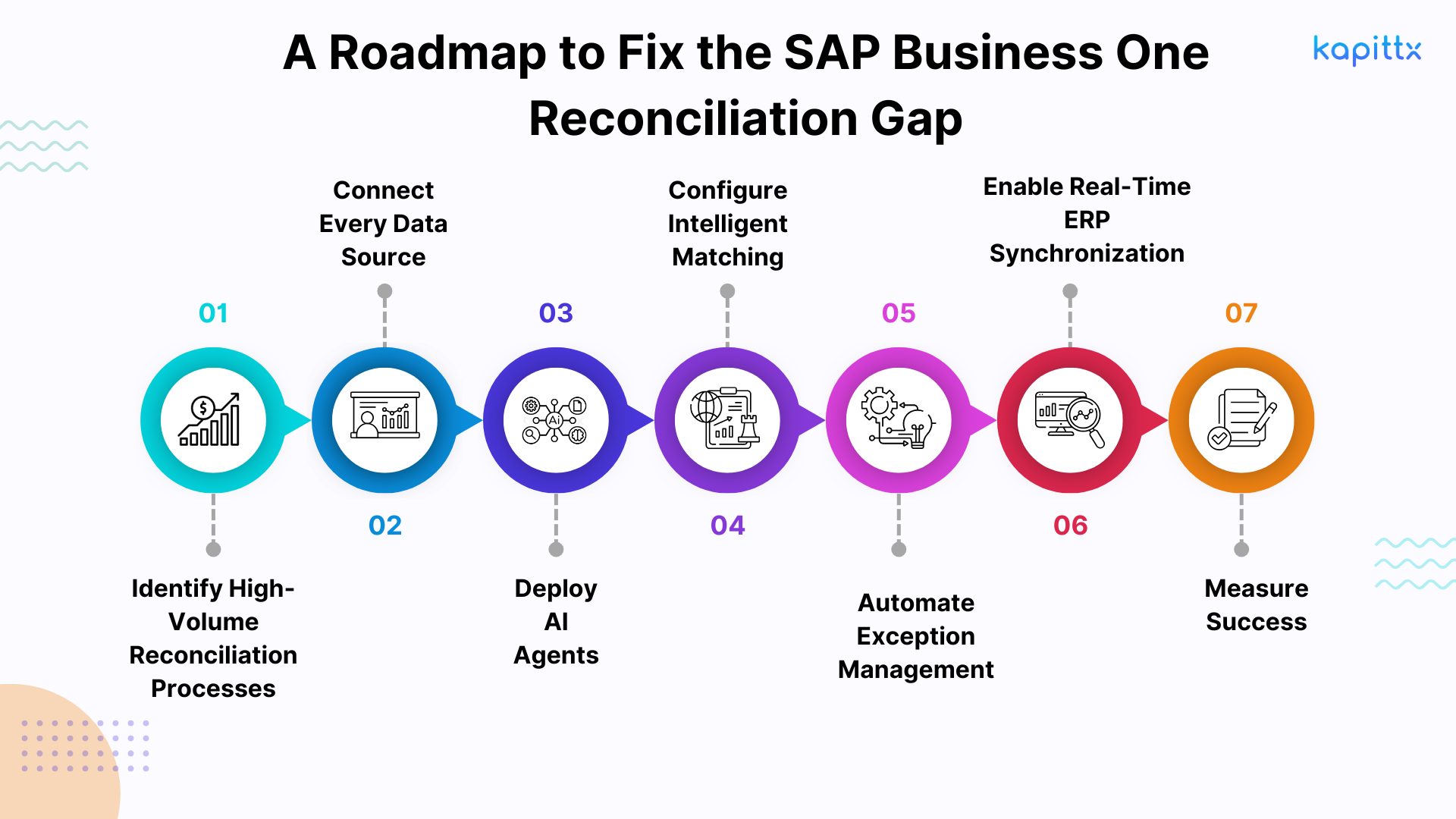
Focus on:
- Cash application
- Bank reconciliation
- Customer remittances
- Vendor reconciliation
- GL reconciliation
Integrate:
- SAP Business One
- Bank files
- Email inboxes
- Customer portals
- APIs
- Shared folders
- PDFs
- Emails
- Excel
- Images
- XML
- EDI
- Bank statements
- Customer remittances
Apply matching using:
- Invoice numbers
- Customer IDs
- Payment references
- Purchase Orders
- Amounts
- Dates
- Historical payment behavior
Only exceptions such as short payments, pricing disputes, unidentified receipts, or duplicate transactions should require manual intervention.
Step 6: Enable Real-Time ERP Synchronization
Automatically synchronize reconciled transactions with SAP Business One to eliminate duplicate work and maintain a single source of truth.
Step 7: Measure Success
Track:
- Cash application rate
- Straight-through processing (STP)
- Reconciliation cycle time
- DSO
- Exception rate
- Manual effort saved
- Month-end close duration
Modern finance requires:
- AI-powered document understanding
- Cash Application AI Agents
- Reconciliation AI Agents
- Intelligent workflows
- Exception-based processing
- Real-time ERP synchronization
Kapittx extends the capabilities of SAP Business One with purpose-built AI Agents that automate high-volume reconciliation and cash application while keeping SAP Business One as the system of record.
Kapittx's Cash Application AI Agent intelligently automates the complete payment allocation process by:
- Reading remittance advice received through email, PDF, Excel, XML, EDI, APIs, customer portals, and scanned documents.
- Extracting invoice numbers, payment references, deductions, taxes, discounts, and adjustment details.
- Matching customer payments against outstanding invoices using configurable business rules and AI.
- Automatically applying straightforward payments while routing exceptions for review.
- Synchronizing reconciled transactions with SAP Business One in real time.
Reconciling customer invoices, bank statements, General Ledger entries, Goods Received Notes, supplier invoices, purchase orders, and supporting documents. Comparing information across multiple systems and document formats instead of relying solely on ERP records.
Detecting missing transactions, duplicate postings, pricing variances, unmatched balances, and policy exceptions.
Learning from historical reconciliation decisions to improve matching accuracy over time.
Delivering an exception-driven workflow so finance professionals review only transactions requiring business judgment.
Together, these AI Agents help organizations:
- Reduce manual reconciliation effort by up to 80%.
- Accelerate cash application.
- Improve working capital visibility.
- Shorten month-end close.
- Increase reconciliation accuracy.
- Strengthen audit readiness.
- Scale finance operations without increasing headcount.
- Enable continuous real-time ERP synchronization with SAP Business One.
For finance leaders looking to modernize Accounts Receivable and reconciliation without replacing their ERP, Kapittx provides the intelligence layer that transforms SAP Business One into an AI-powered finance platform.
Author
